Jake LedfordSenior Product Designer
Main content
Case study · Asset recovery

Redesigning visibility for lender asset recovery

35%faster repossession assignment completion
22%fewer inbound support tickets
8artifacts in use across product, engineering and vendors
01 · Overview

CenterPoint is where lenders are supposed to watch recovery work happen. In practice, status came by email and auction outcomes took a phone call. Title delays arrived with no explanation at all.
Role
Senior UX Designer & Researcher
Timeline
Jul 2025 – Aug 2026
Domain
Repossession, remarketing, claims
Clients
6,000+ banks and credit unions
Team
1 product manager, 4 engineers, 2 vendor partners
My part
Research, information architecture and interaction design, end to end
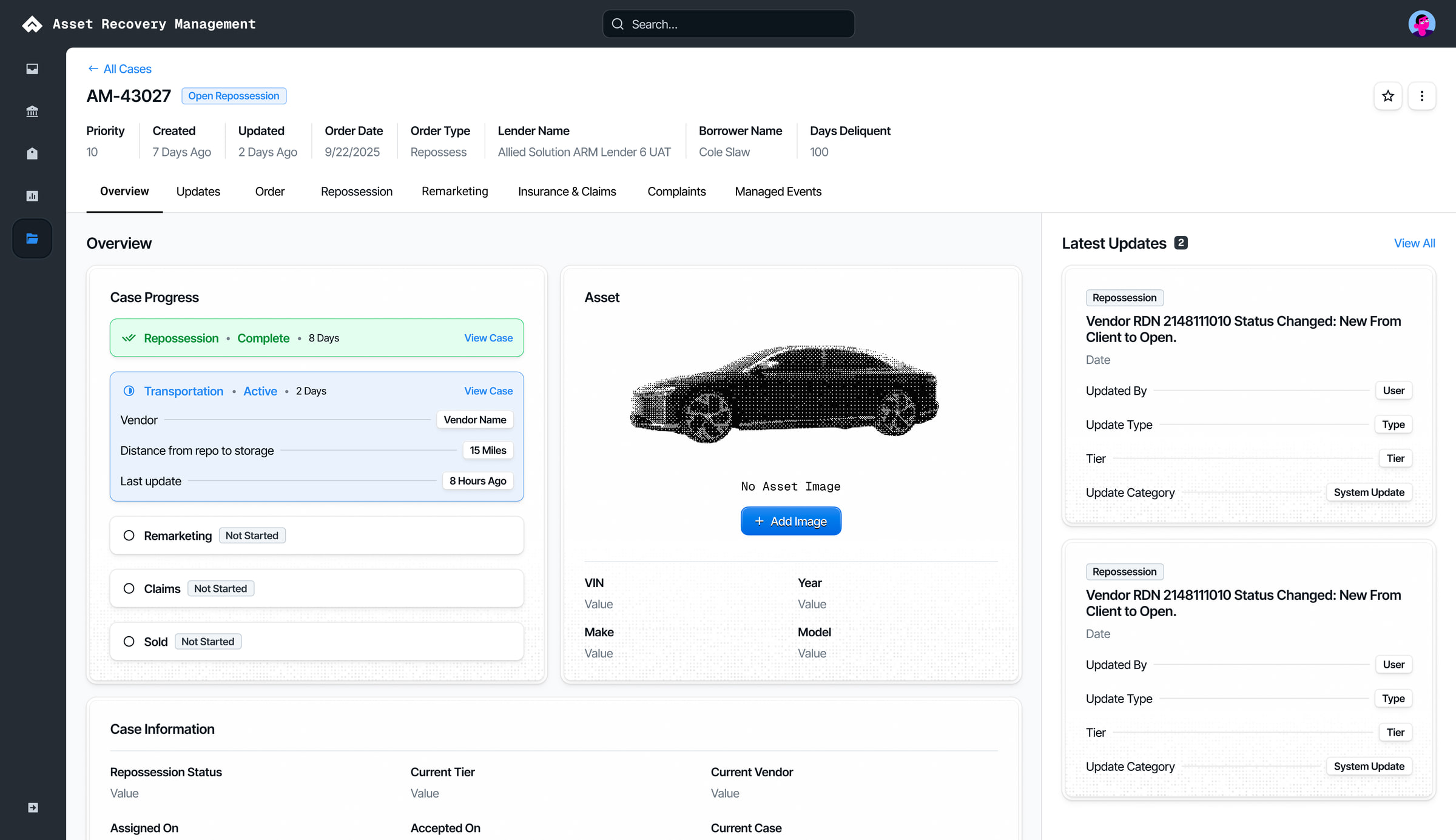
ARM Pega case home page: a case header with priority, dates, lender and borrower, a case progress panel listing each recovery stage, the asset, and a latest updates feed.
The case home page in ARM Pega, the tool Allied's own specialists work a recovery in. CenterPoint, which this study redesigned, is the lender's window onto this same case.
02 · The short version
Problem. Lenders kept the real case record in Outlook and Excel, and CenterPoint lagged behind both.
What I did. Eleven weeks with five credit unions, watching each one work a case before I asked a question.
What changed. Both assignment speed and support volume moved in the first cycle.
Discovery researchJourney mappingPersonasDashboard conceptsUsability protocolCross-client synthesis

03 · How recovery works

When a borrower defaults on a car loan, the lender repossesses the car and sells it at auction. Getting the car and its title ready to sell is post repossession. The sale itself is remarketing.

Who does the work

Banks and credit unions hire Allied Solutions to run that process for them. Allied's own ARM (Asset Recovery Management) specialists do the work.

A case opens

A lender opens a case in CenterPoint. It lands in Snowflake, the one record of that case. From there it opens a repossession order in RDN, the system repo vendors work from, and a case in ARM Pega.

Automatic, when it can be

Pega assigns a repo vendor on its own when the rules allow it.

A specialist, when it can't

When no vendor fits, the case waits in a queue until a specialist assigns one by hand.

Back the other way

Vendors report through RDN and AutoIMS, where the auctions are run. Their updates flow into Snowflake, and on to Pega and CenterPoint.

The window

Pega holds everything Allied knows about a case. CenterPoint shows the lender the part they need.

04 · Context

Lenders had built shadow systems to do the job the product was supposed to do.

Where the work really lived

Outlook folders held active cases.

Where the work really lived

Excel trackers held everything else, maintained by hand so internal records would match what CenterPoint said.

Where the work really lived

Some clients exported data on a schedule just to stay current.

What they asked for

“It would be nice to see all of the actions and all of the correspondence in one place… and once it's been resolved, be able to move it out of that pipeline.”

Sr. Repo Specialist, PenFed Credit Union
05 · Research

Watch first. Ask second.

I ran an eleven week discovery sprint with five credit unions. Sessions opened with the client demoing their own workflow before I asked anything, so I watched what people did instead of hearing what they thought they did.

11
week discovery sprint
5
credit unions
5
journey phases mapped
4
personas
Session format
Client demos their own workflow
Then my questions
Demo first. That format is why the Outlook problem surfaced at all.

14 sessions with 23 people across the four roles, each recorded and tagged the same day.

06 · Journey

A pain point at every handoff

I mapped the journey across five phases, from order placed through active repossession, post repossession, remarketing and claims, and found a pain point at every handoff between them.

Phase 01

Order placed

The lender asks
Did a vendor accept it?
The answer lived in
Email
Handoff

Status came by email.

Phase 02

Active repossession

The lender asks
Where is the vehicle now?
The answer lived in
RDN, then email
Handoff

Title delays arrived with no explanation.

Phase 03

Post repossession

The lender asks
Is the title clear to sell?
The answer lived in
A phone call
Handoff

Auction outcomes took a phone call.

Phase 04

Remarketing

The lender asks
What did it sell for?
The answer lived in
AutoIMS, then Excel
Handoff

Claims went quiet after filing.

Phase 05

Claims

The lender asks
Has the claim been paid?
The answer lived in
The Excel tracker
Mapped for Repo specialistSenior managerClaims leadPortfolio manager
07 · Findings

Three themes held across every client

Email is the system
A folder per open case
Searches the inbox by VIN
Status is the last email received
Forwards vendor mail to self
Flags double as a to-do list
Manager is cc'd on everything
Let me look it up
Opens a ticket to ask for status
Waits a day for a one-line answer
Wants to pull auction results alone
Exports weekly to check counts
Calls a rep to confirm a title
Would rather look than ask
Alerts over email
Mutes the status emails
Wants exceptions only
A daily digest for managers
Needs to know when a case stalls
A badge beats an inbox
Critical changes should interrupt
The synthesis wall. Every observation went up as its own note. These are 18 of the 212, sorted the way they sorted themselves.
Theme 1Email had become the actual case management system.
“…all of the actions and all of the correspondence in one place…”
Sr. Repo Specialist, PenFed Credit Union
Theme 2Clients wanted to serve themselves instead of opening a ticket and waiting.
“I don't want to ask. I want to look.”
Claims lead, credit union client
Theme 3Notifications were moving from email toward in-app alerts, with digests for the events that matter most.
“If everything is urgent, I stop reading.”
Senior manager, credit union client
08 · Decisions

Three calls, and what each one cost

Three decisions shaped the product more than any single finding, and every one of them cost something.

Decision A

Organise around the case

  1. Rejected
    A view per phase Mirrors how Allied's own teams are organised.
  2. Rejected
    A board of cases by phase Good for a manager. Slow for one case.
  3. Chosen
    One case record with a progress spine Every phase on one page, in order.
  4. Because

    Lenders ask about a case, by its number. A case crosses five teams on its way to closed, and every phase view we sketched rebuilt the handoff gaps the research had just found.

    It cost us

    Phase managers lost their at-a-glance list. We gave it back as saved queues, which added a release.

Decision B

Alert by exception, digest the rest

  1. Rejected
    An email for every event What lenders already had, and had muted.
  2. Rejected
    Let each user configure everything A wall of switches nobody would set.
  3. Chosen
    In-app for everything, a digest for exceptions Critical changes interrupt. The rest waits.
  4. Because

    The inbox had already failed as a priority system. When every update is an email, the one that matters looks like the forty that do not.

    It cost us

    Nothing could ship until operations agreed what counts as critical. Defining six update tiers took three workshops.

Decision C

Show vendor data, with its source and its age

  1. Rejected
    Hide it until Allied verifies it Accurate, and a day late.
  2. Rejected
    Show it unlabelled Fast, until it is wrong once.
  3. Chosen
    Show it, labelled with source and time Allied, vendor or lender, on every update.
  4. Because

    Self-service only works if a lender can judge how fresh a status is without asking. A labelled answer that is slightly stale beat a verified one that arrived tomorrow.

    It cost us

    Vendor delays became visible to clients. That was an uncomfortable conversation with our vendor partners, and the right one to have.

09 · Two products

One case, two windows

Think of ARM CenterPoint as a little window into Allied for the lenders to see how Allied is doing.

ARM Pega is where Allied's specialists move a case, and it holds everything. CenterPoint shows a lender the part they ask about. Both read the same record.

Pega · work queues
  1. Claims
  2. Pending Repossession
  3. Exception
  4. Unable to Assign Vendor
  5. Lender Update
  6. Critical Change
  7. Lender Onboarding
  8. Auction Onboarding
CenterPoint · tabs
  1. Open Cases 30
  2. On Hold 5
  3. Closed 10
8 queues, 3 tabs. Specialists work from queues. A lender wants to know whether a case is open, on hold or closed.
Pega · case tabs
  1. Overview
  2. Updates
  3. Order
  4. Repossession
  5. Remarketing
  6. Insurance & Claims
  7. Complaints
  8. Managed Events
CenterPoint · case steps
  1. Repossession
  2. Remarketing
  3. Billing
8 tabs, 3 steps. A Pega case has a tab for every kind of work done on it. A CenterPoint case has one step per phase.
Pega · case status
  1. New: Pending Assignment
  2. New: Pending User
  3. Pending-Asset Classification
  4. Open: Repossession
CenterPoint · status
  1. In Progress
  2. On Hold
  3. Closed
  4. Positive Close
Plain statuses. Pending asset classification is Allied's work to do. The lender sees that the case is in progress.
Pega · case header
  1. Priority
  2. Created
  3. Updated
  4. Order Date
  5. Order Type
  6. Lender Name
  7. Borrower Name
  8. Days Delinquent
CenterPoint · case header
  1. Case ID
  2. Clear for Sale Date
  3. Sale Date
  4. Last Update
Same case, two headers. Priority and days delinquent are how a specialist sorts the work, and a lender never needs its own name on a case. A lender asks when the car clears for sale, when it sells and what changed last.
10 · Design

What I delivered

  1. A five phase journey map and four personas: repo specialist, senior manager, claims lead, portfolio manager.
  2. Documentation of how lenders stitch email, Excel, RDN and AutoIMS together.
  3. Mockups for a centralized dashboard with live case status, auction tracking and in-app notifications.
  4. A Maze usability protocol targeting 80% task completion, measured with SUS, SEQ, task time and misclick rate.

Every case, one list

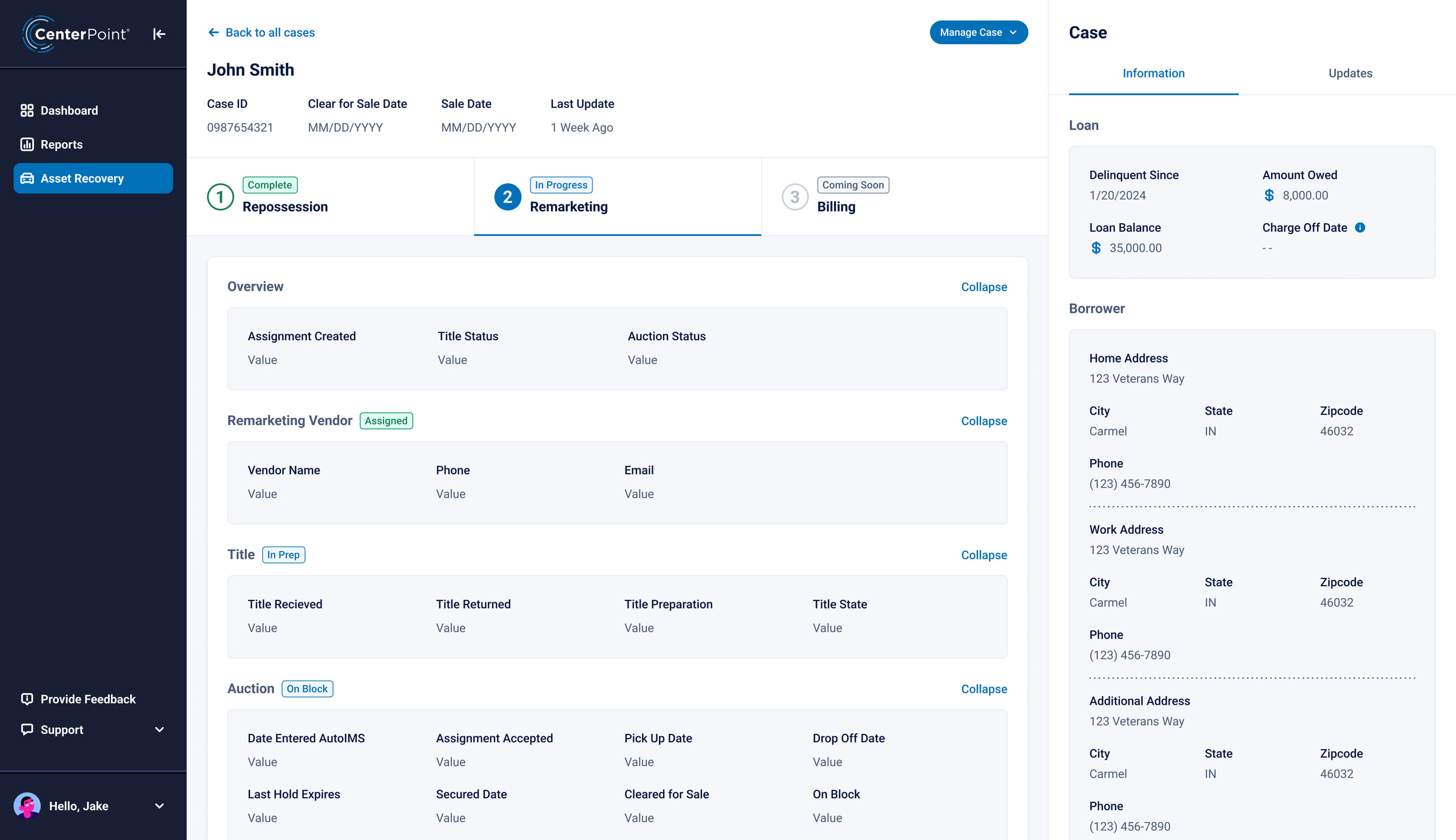
Open, on hold and closed, with each case's ARM phase and status on its row. The answer lenders were emailing to get is on the first screen.

A progress spine

Every case runs repossession, remarketing, billing, each marked complete, in progress or coming soon. The vendor and the recovery sit under the step they belong to.

Remarketing in view

Title and auction status, with the dates the car entered AutoIMS, cleared for sale and went on the block. No phone call to the auction desk.

Updates on the case

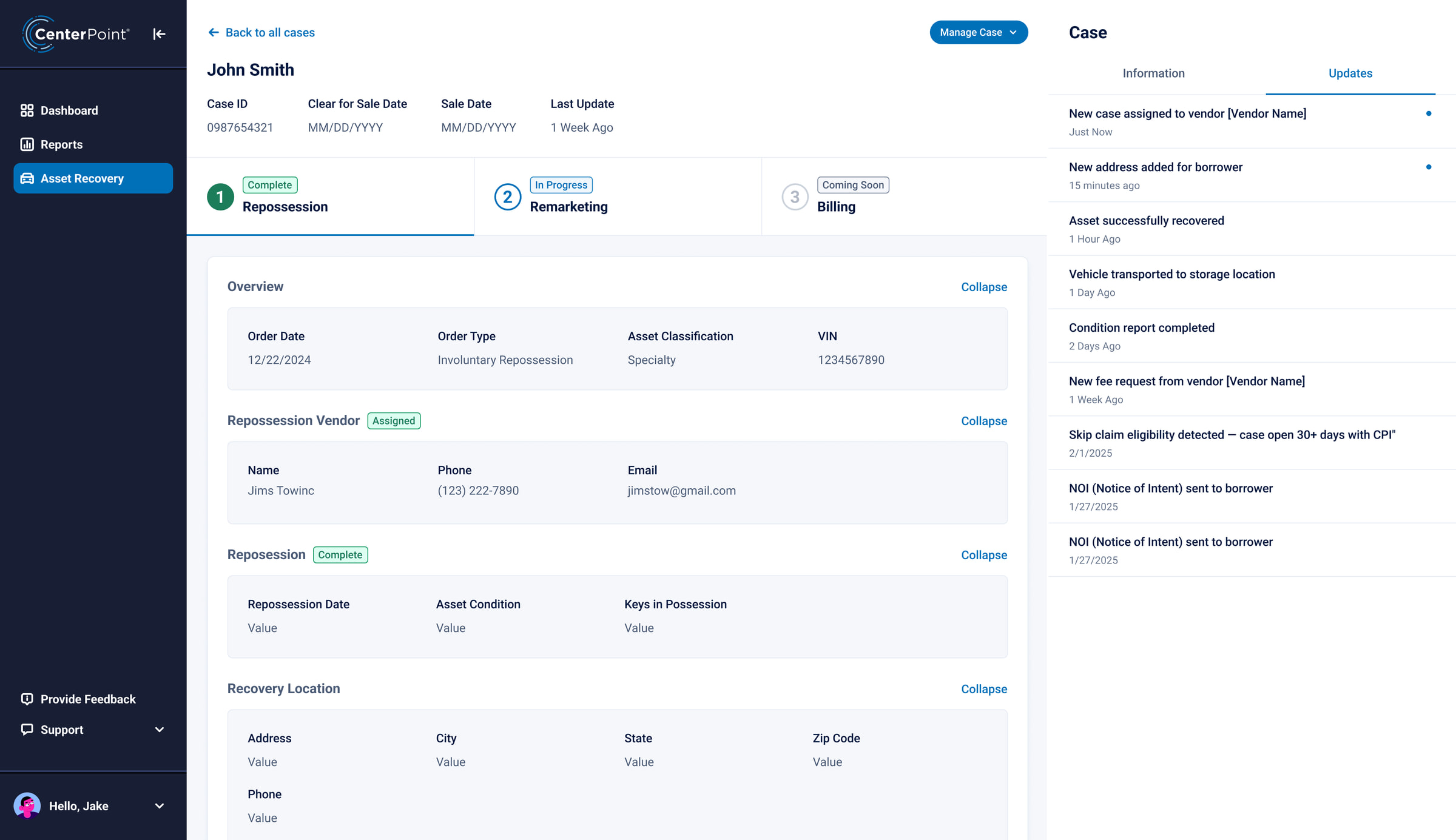
Every event lands on the case: vendor assigned, asset recovered, transported, condition report done. New ones keep a dot until they are read.

Act on the case

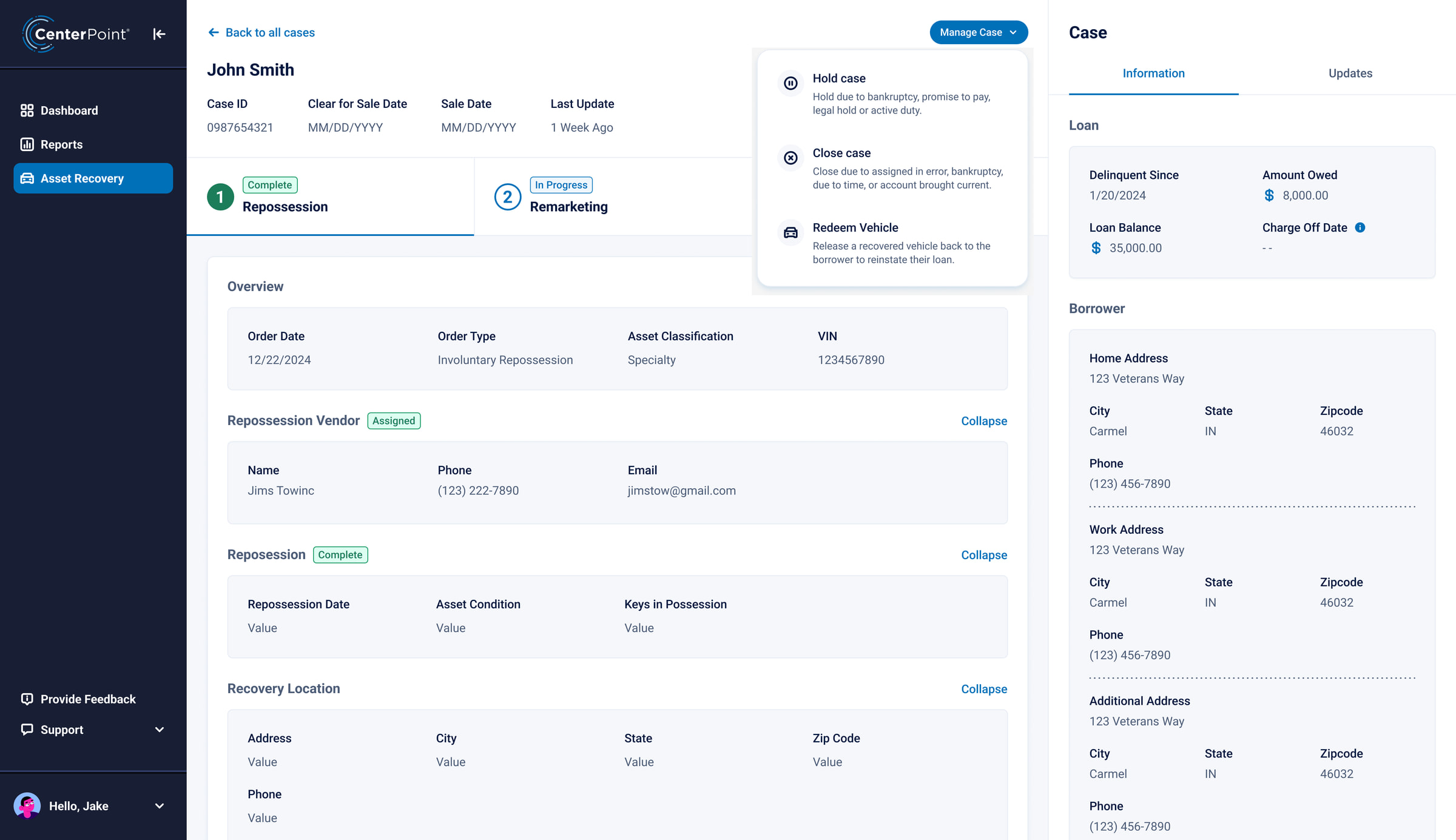
Hold, close or redeem from the case header. Each opens a short form that goes to Allied for review.
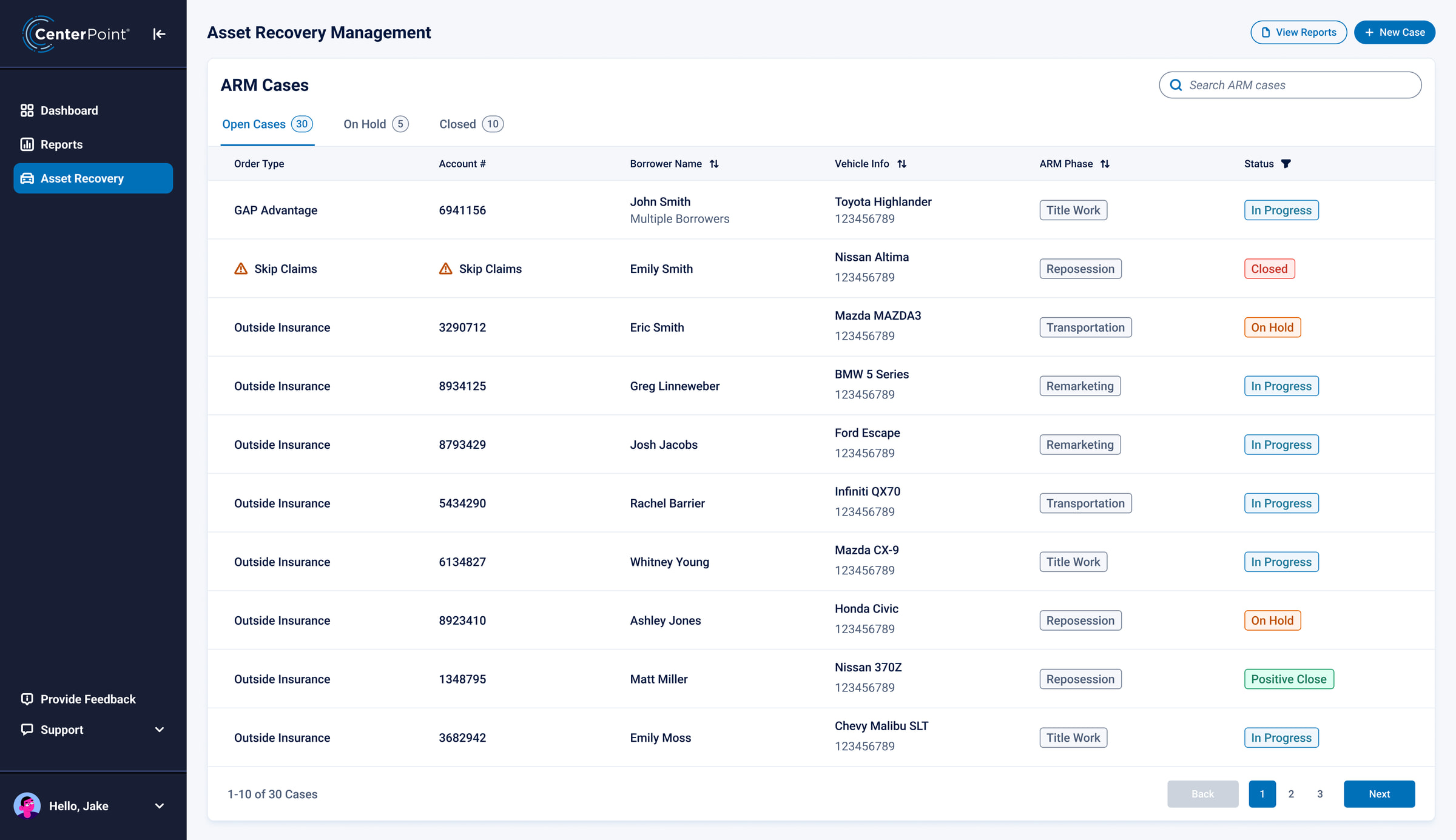
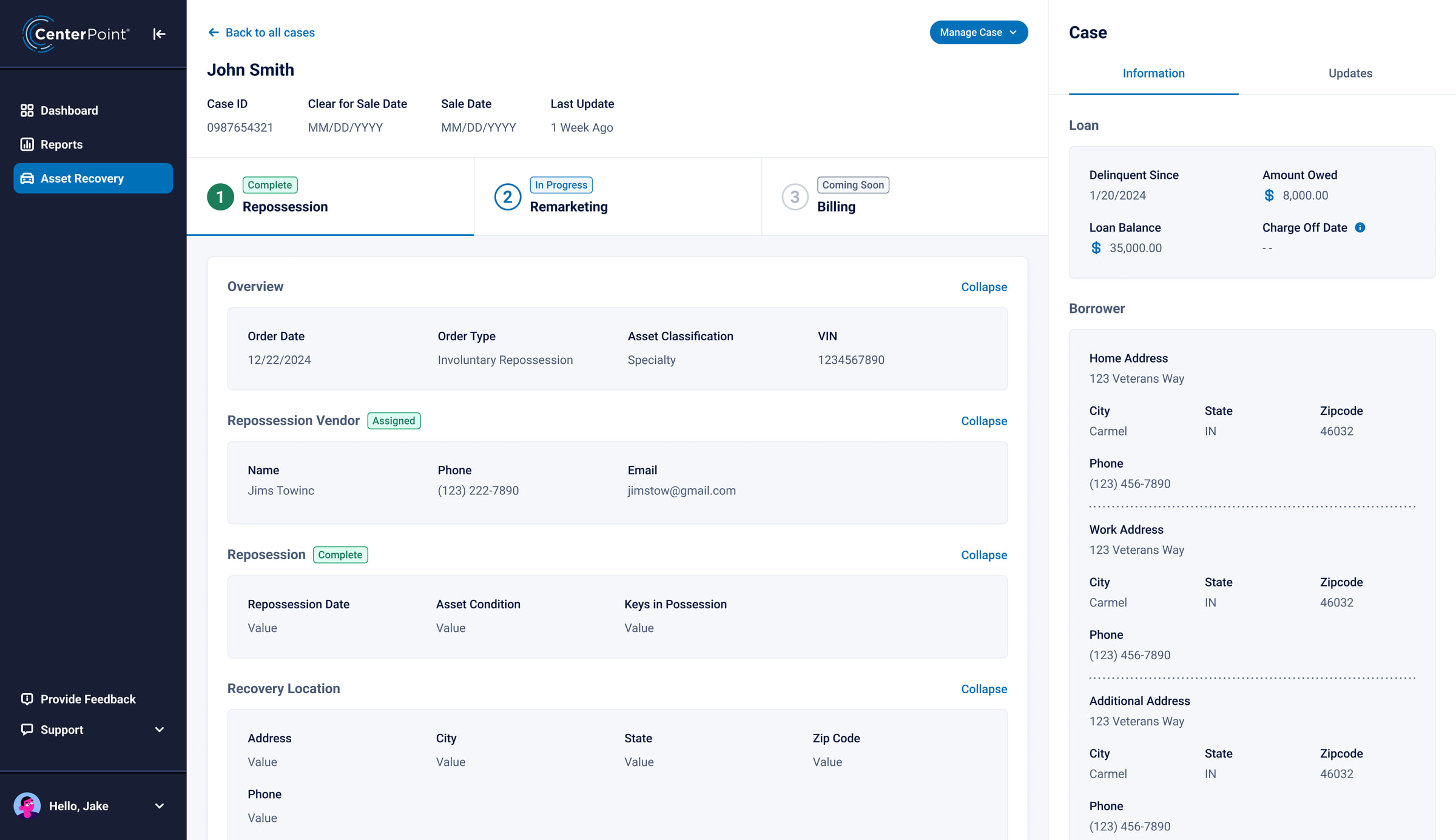
CenterPoint's ARM Cases list with the ARM phase and status columns highlighted. A CenterPoint case with its three steps highlighted: repossession complete, remarketing in progress, billing coming soon. The remarketing step of a case, with its title and auction sections highlighted. The case rail's Updates tab: vendor assigned, address added, asset recovered, transported, condition report, fee request, notices. The Manage Case menu opened from the case header: hold case, close case, redeem vehicle.

Before and after, for one case

Drag the handle. On the left, how a repo specialist at the lender found the status of a case. On the right, the same case in CenterPoint.

After: the same case in CenterPoint, with its repossession, remarketing and billing steps, the assigned vendor and the case information rail.
11 · Validation

A test with a bar to clear

A Maze usability protocol targeting 80% task completion, measured with SUS, SEQ, task time and misclick rate.

87%
Above the bar. 12 participants from 4 credit unions ran 5 tasks on the prototype, unmoderated.
82SUSSystem Usability Scale, benchmark 68
6.1SEQSingle Ease Question, out of 7
14sTask timemedian, find a status
9%Misclick rateacross all tasks
The four measures. All four cleared their benchmarks on the first round.
Completion by task · dashed line is the 80% target
Find the current status of a case
100%
See what changed since yesterday
92%
Find an auction result
83%
Filter updates to one vendor
92%
Move a resolved case out of the queueBelow target
67%
What failed. Four of twelve people could not move a resolved case out of the queue, the exact thing the PenFed specialist had asked for. The action sat inside the overflow menu. I promoted it to a button on the case header and retested with the same task: 11 of 12.
12 · Outcomes

Both numbers moved in the first cycle

35%
faster repossession assignment completion Median hours from order placed to vendor accepted. 90 days before release against 90 days after. Source: CenterPoint event log.
22%
fewer inbound support tickets Tickets tagged as status requests in the service desk, over the same two windows.
8
artifacts in use across product, engineering and vendors The journey map, four personas, the tool-stitching document, the usability protocol and the dashboard specification.
Status-request tickets per week13 weeks before and after release
Where the tickets went. The recommendations that shipped first targeted the handoffs where lenders lost the most time, and both assignment speed and support volume moved in the first cycle.

“We stopped arguing about whose spreadsheet was right.”

Product lead, asset recovery
One map. Product, engineering and UX now work from the same journey map and personas when they argue about sequencing.
13 · Reflection

What I would do differently

  1. I tested with the lenders' repo specialists first and their managers late. Managers read by exception, and my first dashboard did not. Next time both are in the room from week one.
  2. We rebuilt the baseline from logs after the fact, and it cost two weeks. I now instrument before I redesign.
  3. Opening every session with the client's own demo goes on every project from here.
Next case study · Furnished Quarters

Rebuilding the quote tool around the quote →